Data from existing OEM sensors is read and displayed directly in the app.

STM-520
Tyre pressure and temperature – right on your smartphone or tablet.
With the STM-520, you can view tyre pressure and temperature for each wheel directly on your smartphone or tablet. Existing OEM sensors can continue to be used; alternatively, the system operates as a complete retrofit solution with universal sensors.
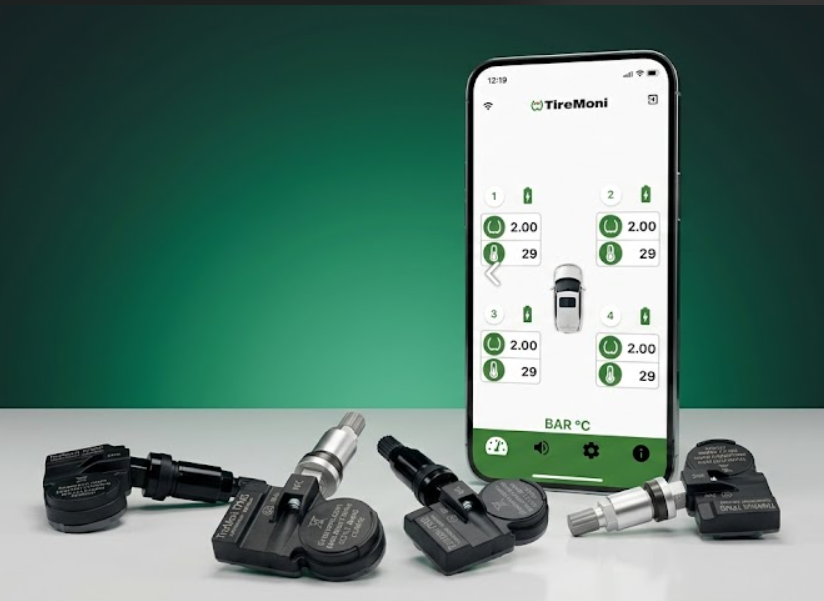
Open the app, set it up, hit the road – and keep an eye on the most important tyre data at a glance. That’s exactly why the STM-520 is popular with drivers who prefer to know in advance rather than being warned at the last minute.
Why the STM-520 is different
Your vehicle is already fitted with sensors.
But can you see their details?
Most modern vehicles have a TPMS – but often the only visible part of it is
a warning light. The STM-520 reads the signals from your existing sensors and
displays the pressure and temperature of each tyre in real time on your smartphone.
Clear and easy to understand, before a problem arises.
Clarity rather than a warning light
The STM-520 displays precise readings for pressure and temperature – not just an icon.
Use existing sensors or retrofit internal sensors
Greater control in everyday driving
You can see which tyre is affected, how significant the deviation is – and whether any action is required.
Try the TireMoni app now
Try the TireMoni TPMS Connect app
free of charge, straight away on your Smartphone.
Simply scan the relevant QR code or open the direct
Download link for Android or iPhone.

Google Play
TireMoni TPMS for Android

App Store
TireMoni TPMS for Android
Two use cases, one solution
Whether original sensors or retrofit – STM-520
adapts to your vehicle.
Every vehicle is different. That is why there are two clear ways to use the STM-520
can be used. Both lead to the same result:
Accurate tyre data on your smartphone, whenever you need it and at a glance.
Are your OEM sensors faulty or too expensive? Upgrade with TireMoni NFC universal sensors – compatible with 98% for all makes of vehicle, including spare sets, trailers, caravans and additional axles.
What you’ll need
STM-520 receiver, TireMoni NFC universal sensors and the DAM-100 programming tool (optional). The sensors are programmed to your vehicle profile once via the app.
Compatible with 98% for all makes of vehicle
Ideal for spare sets, trailers and vehicles without TPMS
Can be programmed via a smartphone app using NFC
Programme it once, use it for life
Important for Option 2
The DAM-100 – Precise programming for
universal application.
If you wish to use TireMoni universal sensors, the DAM-100 is the tool that brings it all together. It programmes the sensors to match your specific vehicle profile – either by vehicle model or OE part number.
Benefits of the app
Programming, cloning, documenting
Programming by vehicle model or OE part number
Cloning existing sensor IDs when replacing faulty sensors
Activating sensors via radio
Support with the vehicle’s relearning process
Documentation of all programming and servicing procedures
It's as simple as that
Three steps to accurate
Tyre details.
We’ve deliberately kept it simple to get started. The TireMoni Connect app
guides you step by step – without the need for any prior technical knowledge and
without having to visit a garage.
Step 01
Install the app and connect the connector
Install the TireMoni Connect app on your smartphone or tablet and connect the STM-520 via USB-C. No need to tamper with the vehicle’s electronics, and no need to visit a garage.
Step 02
Select a vehicle and connect the sensors
Select the make, model and year of manufacture in the app.
Step 03
Pair existing sensors
The ID must be entered once and is stored in the app via the STM-520 box
Step 04
See pressure, temperature and alerts straight away
The app displays the tyre pressure and temperature for each wheel. The system issues an immediate warning in the event of critical deviations – even whilst driving.
Data security and convenience
All your data remains with you.
All settings are stored locally on your device. Backup and Restore makes it easier to change vehicles and/or tyres. The app is available free of charge from the App Store and Play Store. Demo data allows you to try it out even without an STM-520.
All settings are stored locally on your device
Download the app for free from the App Store and
Play Store
Backup and restore make it easier to change devices and change tyres
Can be tested using demo data – even without the STM-520
Technical Orientation
Key system data at a glance.
STM-520 Receiver
Property
Connection
Power supply
Compatibility
Advertisement
Warning thresholds
Further compatibility
Value
Bluetooth LE and 433.92 MHz
USB-C
OEM TPMS + NFC Universal Sensors
Up to 8 wheels
LoP, HiP, HiT (individually adjustable)
Sat-nav devices with Bluetooth SPP (e.g. ESX Navi)
NFC Universal Sensors
Property
Programming
Compatibility
Deployment
Distinctive feature
Value
Via NFC using a smartphone app
98% for all makes of vehicle
Replacement for original sensors or retrofitting
Can adopt OE sensor IDs
STM-520 Receiver
Connection
USB-CLE
Power supply
USB-C
Compatibility
OEM TPMS + NFC Universal Sensors
Advertisement
Up to 8 wheels
Warning thresholds
LoP, HiP, HiT (individually adjustable)
Further compatibility
Sat-nav devices with Bluetooth SPP (e.g. ESX Navi)
NFC Universal Sensors
Programming
USB-CLE
Compatibility
USB-CLE
Deployment
USB-CLE
Distinctive feature
USB-CLE
Suitable for your vehicle
Is the STM-520 compatible with your vehicle?
Yes, if
Your vehicle is already fitted with TPMS sensors and you’d finally like to see their readings in real time on your smartphone.
You want to replace faulty original equipment (OE) sensors cost-effectively or switch to universal sensors when changing tyres.
If you wish to retrofit TPMS sensors
Whether you’re looking for an app solution for cars, spare sets, trailers, caravans or additional axles.
Probably not, if
If you deliberately prefer external, screw-on sensors – then the STM-572 is usually the more suitable choice.
You would prefer a traditional system with a separate display rather than an app-based solution.
Frequently Asked Questions
The key questions to consider before making your decision.
What exactly can I see in the app?
The app shows you the tyre pressure and temperature for each individual tyre directly on your smartphone or tablet. You can also set warning thresholds so that you are notified immediately in the event of any critical deviations.
How does the initial set-up work?
Install the app, connect the STM-520 connector and select your vehicle. Existing OEM sensors are detected; universal sensors are programmed to fit once and then integrated.
Does the system also warn me automatically whilst I’m driving?
Yes. The system monitors tyre data whilst the vehicle is in use and alerts you in good time if the pressure is too low or too high, or if the temperature rises to a critical level.
Do I absolutely need the DAM-100?
The DAM-100 is only required if you wish to work professionally with internal sensors (pairing sensors, unpairing sensors, programming sensors). If you are using existing OEM sensors, the STM-520 receiver and the TireMoni Connect app are sufficient.
What happens if my OEM sensors are faulty?
Faulty or expired OEM sensors can be replaced with TireMoni NFC universal sensors. This is often the more cost-effective alternative to original manufacturer sensors.
Can I try out the app before buying it?
Yes. The TireMoni Connect app is available free of charge and can be tried out using demo data – even without an STM-520.
What costs are involved after the purchase?
There is no subscription and no ongoing app charges. You make a one-off investment in the right configuration and can then use the system indefinitely.
Next step
Find the right TireMoni system for you now
Our selection guide will help you find the right system in 60 seconds.
 English (UK)
 Deutsch
 Français
 Italiano
 Español
 Nederlands
 Dansk